TodAI for companies
Five minutes a day for your team to learn to use AI.
And a report that shows you are doing it.
An example team of 40 people: 28 have started 6 have signed up 6 haven't joined yet
How it reaches your team
One message and your whole team is in.
A session with us. We choose your keywords, companies and competitors, and the roles in your team.
A message to forward. We give you a link and a company code. You paste it where you already talk: email, Slack, Teams or a QR code in a meeting. No lists to upload, no accounts to create.
Each person joins from their iPhone, enters the code and picks their role. iPhone only for now; Android is in the plan.
From day one, their five minutes (three news stories, a short lesson and a quiz) are tailored, and you see it in the dashboard.
If you prefer to manage it person by person, you can also invite people by email or with a CSV.
You, in the team channel
Team: from today, five minutes of AI a day. Join from your iPhone with the code ACME-24.
Tailored to your company.
Pick each one to see it.
For your team
For you
Your news
With your keywords, companies and competitors.
- claims
- policies
- Acme Seguros
- reinsurance
Insurance
An insurer tests AI to handle claims faster
Picked for: claims · reinsurance
Lessons by role
Everyone sees what helps them most first.
What they see first
- Drafting a proposal with AI
- Writing to a client
- Summarising a meeting
Tailored lessons
You request them from the dashboard. We build them and a person reviews them.
Example«Using AI to review policies»
- You request it from the dashboard
- We build it
- A person reviews it
- It reaches your team's app
Share a story
Paste a link or a screenshot and the next day it's in the app.
Today
https://…/ai-claims-guide
Tomorrow
From Acme Seguros
Industry guide on AI in claims handling
Your AI policy Coming soon
Your rules, turned into a short lesson with its quiz.
What data you can use with AI
Can you paste a client's data into a public AI tool?
- Yes, if it's for work
- No: use the approved AI
Coming soon See how it would work
The Monday email
How the week went and one suggested action.
TodAI · Your week at Acme Insurance
1. Active: 15 of 34 people who signed up, in the last 7 days (22 in 30 days).
2. Sign-ups: 34 of 40 invited have signed up; 28 have started a lesson.
3. Where they get stuck: “Talk to AI Like a Colleague, Not Like Google”, 9 of 27 left it halfway.
Suggested action: Remind the 26 people with “AI Foundations” pending (due in 10 days): in your dashboard, “Required training” → “Remind pending people”.
The report, as a PDF
For management: coverage, areas and required training.
AI training report
Acme Insurance · example data
| Invited | 40 |
|---|---|
| Signed up | 34 |
| Started | 28 |
| Active in the last 7 days | 15 |
| Active in the last 30 days | 22 |
Figures for groups of fewer than 5 people are not shown.
Reminders
To whoever has required training pending, with one button (one every 24 hours).
Sent to 26 people. The next one, tomorrow.
Coming soon Automatic too: a reminder 7 days and another 1 day before the deadline, without pressing anything. See how it would work
The dashboard for managers
What you see of your team.
- Who is doing it?
- What are they learning?
- Where is there a gap?
By area, with a traffic light, the required training with its deadline and where people get stuck.
See the example dashboard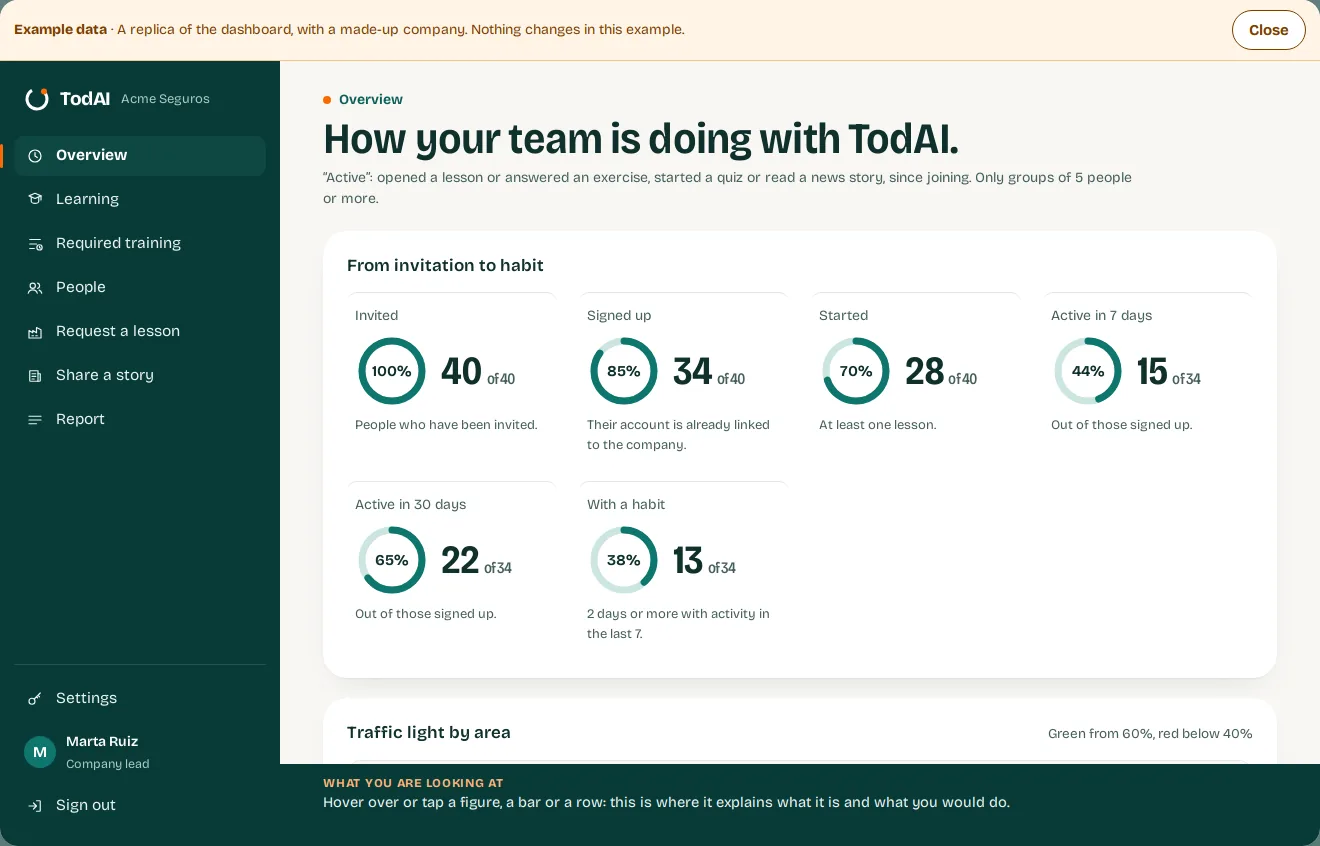
Each dot is one person.
This is how you see each area. And areas with fewer than 5 people are merged into “Others”, so a small group's figures don't point to anyone.
See the data
| Area | Active | Invited | Status |
|---|---|---|---|
| Consulting | 12 (86%) | 14 | green |
| Operations | 6 (50%) | 12 | amber |
| Sales | 2 (25%) | 8 | red |
| Others | 2 (33%) | 6 | red |
See the data
| Area | Active | Invited | Status |
|---|---|---|---|
| Consulting | 12 (86%) | 14 | green |
| Operations | 6 (50%) | 12 | amber |
| Sales | 2 (25%) | 8 | red |
| Others | 2 (33%) | 6 | red |
What we aim for
What it does for your company.
Training tailored to you + a dashboard to follow it: to help your team use AI better.
For each one, what we aim for and how we work on it. They are goals: the dashboard shows you who is progressing and who isn't.
-
Handing repetitive work to AI
Helping your team learn which recurring tasks it can hand to AI, and which it can't.
How we work on it A whole block on automating what you repeat, within the five minutes a day. How it reaches your team
-
Training on what matters to you
Helping people learn what your company needs, not just anything about AI.
How we work on it Tailored lessons you request from the dashboard: we make them and a person reviews them. And required training with its deadline. Built around you
-
More from the AI tools you already use
Asking well from the start, to get to what you need sooner.
How we work on it The daily lessons. A whole block, “The Art of Asking”, teaches how to ask AI for things. See the lessons
-
Same work, fewer tokens
Doing the same work with fewer tokens, whether you pay per use, run your own model or have a subscription.
How we work on it Lessons on the context window, restarting long chats and when a fast model is enough. See the lessons
Coming soon
These are pieces we're working on, with example figures.
Skills mapSix skills, from 0 to 100, by area.
Coming soon Six skills, from 0 to 100, by area. Pick an area and watch the shape change.
Legal and Leadership are shown together as “Others” (fewer than 5 each)
Hover over or tap a corner to see what it measures and which lesson raises it.
Ask the dashboardPlain questions about your data, always aggregated.
Coming soon Plain questions about your company's data, always aggregated.
Which area is doing worst, and why?
Sales. Only 2 of 8 people have been active in 30 days (25%), 3 have not signed up yet and nobody has finished AI Foundations, which is due in 10 days.
Comes from: Traffic light by area · Example
What should I do this week?
Remind the 26 people with AI Foundations pending: it is due in 10 days and Sales is at 0 of 8. It is one button: “Remind pending people”.
Comes from: Required training · Example
Where is the team getting stuck?
In lesson 3, “Talk to AI Like a Colleague, Not Like Google”: 9 of the 27 who started it left it halfway. And an exercise in AI Foundations is missed by 60%.
Comes from: Where people get stuck · Example
Before and afterThe same quiz when people join and after 8 weeks, by area.
Coming soon The same quiz when people join and after 8 weeks, by area. How much each one has improved.
on joining after 8 weeks
Hover over or tap an area.
Impact pulseOne question a month: have you used AI this week?
Coming soon One question a month in the app: “Have you used AI in your work this week?”. You see the share of “yes”, by area.
Hover over or tap a cell.
Your AI policy, inside the appYour AI rules, turned into a lesson with its quiz.
Coming soon You give us the PDF with your rules for using AI and we turn it into a short lesson with a quiz. A person reviews it before it is published.
Hover over or tap each step or at the ring.
Automatic reminders7 days and 1 day before the deadline, without pressing anything.
Coming soon Without pressing anything: 7 days and 1 day before the deadline, a reminder to whoever still has the required training pending.
Hover over or tap each point on the line.
What is not there yet: the app is only for iPhone, and people do not sign in with their company account (SSO).
Let's design TodAI for your company.
Sectors, keywords, your own content and a dashboard for managers: we set it up with you, not from a template.
Tell us how big your team is and we will show you the demo with your areas. We reply from soporte@todai-ai.com.
We are now opening TodAI to our first companies.